Picrew PFP & OC Maker
- 4.4
- Rating
- 1.00M
- Installs
- Free
- Price

 Analysis by App-foxy
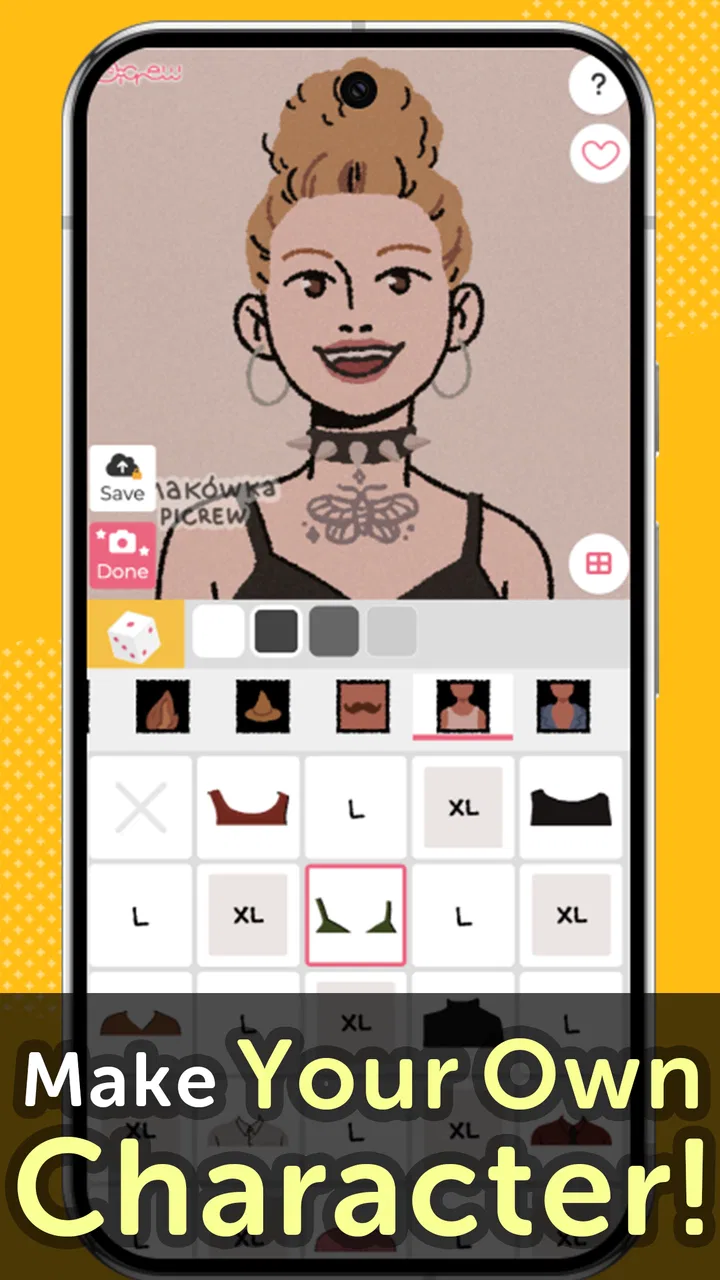
I approached Picrew PFP & OC Maker as an art and design app rather than a full drawing studio. Its appeal is immediate: instead of starting with a blank canvas, I can build a profile picture or original character by combining visual parts in a guided creator. That makes it much less intimidating than traditional illustration software, especially when I want a polished avatar quickly without learning layers, brushes, masks, or color theory first.
The app is free to install, developed by TETRACHROMA INC., and aimed at Teen users. It has reached over a million installs and holds a 4.3 average from around 36 thousand ratings, which suggests that the character-maker format has found a sizeable audience. I would not treat popularity as proof that every person will enjoy it, though. The real question is whether you want a fast, expressive character-building tool or the freedom of drawing everything yourself.
How the creator feels in everyday use
The strongest part of the experience is the reduction of creative friction. I can begin with a basic character idea and concentrate on choices such as appearance, mood, styling, and overall identity instead of worrying about anatomy or technical drawing. That makes the app useful when I need a new avatar for a social profile, a visual reference for a role-playing character, or a quick concept to share with friends.
You May Also Like

 Blood Strike: 2.5 Anniversary
Blood Strike’s Loadouts Turn Every Drop Into a Tactical Gamble
A close look at Blood Strike’s custom loadouts: how fast access to signature weapons reshapes its battle royale rhythm, rewards preparation, and narrows the gap between fights.

 Pandora - Music & Podcasts
Pandora’s Music Is Easy to Start, but Harder to Recover
Pandora’s strength is its low-effort path from a seed to a station. Its weak spot is how much confidence it asks you to place in connection, setup, and quiet recovery.

 8 Ball Pool
 Is Built on Rivalries, Rematches, and Routine
A close look at the rivalries, rematches, shared routines, and unanswered safety questions that turn a quick pool match into a persistent mobile community.

 Samsung Music
’s Quiet Strength Is Playing What You Already Own
Its reach comes less from spectacle than from dependable access to a personal library. That simplicity is both the app’s strongest retention engine and its ceiling.

 AccuWeather: Weather Radar
AccuWeather Review: A Quick, Clear Forecast for Everyday Decisions
For everyday plans, the best forecast is the one you can understand quickly. AccuWeather makes rain timing, radar, and local conditions easy to act on, with a few trade-offs.

 Hill Climb Racing
Why Hill Climb Racing Still Turns Crashes Into One More Run
A tiny car, a bumpy hill and one more upgrade: Hill Climb Racing keeps resurfacing because its simple chaos makes every near-miss feel personal.
More From Our News Desk



I found this especially convenient in a familiar everyday situation: creating a new profile image when I want something more personal than a photograph but more distinctive than a generic icon. A short session is enough to explore a few directions, compare the feeling of different combinations, and settle on an image that communicates something about me. The process feels closer to assembling a visual identity than completing an illustration assignment.
That distinction matters. The app’s store summary presents it as a custom character creator and PFP maker, while its short description calls it Picrew Maker. In practice, I would place it between a template-based avatar tool and a lightweight character-design playground. It gives me more personality than a standard icon generator, but it does not replace a drawing app when I need precise control over every line.
Why the guided format works
Blank-canvas apps can be powerful, but they also create a problem: the first decision is often where to begin. Here, the structure gives me a starting point. I can experiment with a character without committing to a long illustration session, and that lowers the cost of trying unusual ideas. For beginners, this is a meaningful advantage because the app turns “make a character” into a sequence of manageable visual decisions.
It is also useful for people who think visually but do not necessarily draw well. I can test a character concept before writing a description, commissioning artwork, or spending time learning a more advanced tool. For writers and tabletop players, that makes the app a handy brainstorming companion. The resulting image may not be a definitive piece of concept art, but it can clarify the character’s look and help other people understand the idea.
My advice is to treat the first version as a sketch of identity, not as the final answer. I get better results when I decide on the character’s personality or intended use before making choices. A friendly avatar, a mysterious original character, and a professional-looking profile image need different visual priorities. Starting with that purpose prevents me from selecting attractive parts that do not work together.
Where it differs from drawing apps and avatar generators
Compared with a conventional drawing app, Picrew PFP & OC Maker is faster to learn and less demanding, but also more constrained. A drawing app gives me control over proportions, textures, lighting, and tiny corrections. This creator is better when I value speed, consistency, and playful experimentation over manual precision.
Compared with a basic avatar generator, it feels more intentional. A generic generator may be convenient for producing a serviceable icon, but a character-focused workflow encourages me to think about the person behind the image. That makes it a better fit for original-character concepts and expressive profile pictures. The trade-off is that a guided system can only offer the visual choices built into its design, so users seeking a very specific appearance may eventually hit a creative boundary.
I would choose a drawing app for a finished illustration, a photo editor for realistic imagery, and this app for a quick stylized identity. That sounds simple, but it is the most useful way to decide. The wrong expectation is likely to create disappointment; the right expectation makes the focused workflow feel efficient.
Trust, controls, and moments that deserve attention
When I review an app that helps create personal images, I pay attention not only to the creative result but also to the points where I make decisions about my content. A profile picture, an original character, or an image shared with friends can reveal personal taste and identity. I therefore prefer to move through the app deliberately, checking what I am selecting and where I am sending the finished work rather than treating every button as harmless decoration.
The practical trust signal here is user choice. I can decide whether a character is merely an experiment, a private image for my own use, or something I want to share elsewhere. That separation is important. I would first create and review the image, then save or share it only when I am satisfied with both its appearance and its intended audience.
I would also avoid putting sensitive real-world details into a character design. An avatar does not need to reveal my workplace, school, location, or identifying habits. Even when the image is fictional, small visual clues can become personal when combined with a public username or biography. Keeping the design imaginative rather than autobiographical is a sensible privacy habit.
What I check before saving or sharing
My preferred workflow has three stages. First, I build the character without rushing toward publication. Second, I inspect the finished image at full attention, looking for accidental details, awkward combinations, or anything that does not fit the intended audience. Third, I decide whether it belongs on a public profile, in a private conversation, or only in my own collection.
This is more than cautious routine. Character creators make experimentation feel disposable, but a saved image can become part of a long-term online identity. I would be especially careful if the image is intended for a work-related account, a community with age restrictions, or a profile shared with people I do not know personally. The Teen content rating is a reminder that the app is not positioned as a children’s toy, so I would use the same judgment I apply to other social-facing creative tools.
Another useful habit is keeping separate versions of an idea. I might make one expressive image for friends and a simpler one for a public account. This avoids forcing one avatar to serve every context, and it lets me experiment without immediately changing the identity people associate with me.
Account and purchase awareness
The app is free, which makes trying the basic experience easy. At the same time, in-app purchases range from $1.99 to $39.99 per item. That range is worth noticing before I explore optional content or confirm any purchase. I would not assume that every attractive addition is necessary to make a good character, and I would pause to check the price shown at the moment of purchase rather than buying impulsively during a creative streak.
This is one area where my own agency matters more than the app’s playful presentation. A character-building session can encourage repeated experimentation, and that can make optional items feel more urgent than they really are. I recommend setting a personal spending limit in advance and deciding whether the result genuinely improves the project. For a single profile picture, the free experience may be enough; for someone who uses the app regularly for original-character work, paid additions may feel more worthwhile.
I also prefer to keep account decisions separate from design decisions. If the app presents sign-in, sharing, or other account-related choices, I would read each screen instead of accepting automatically. The same applies to any permission prompt: I would grant only what is necessary for the action I am trying to complete, and I would revisit device settings later if I no longer use that function.
Handling personal and creative data thoughtfully
The most data-sensitive moment is usually not the act of choosing a hairstyle or outfit; it is what happens when I save, export, or share the finished image. Before sending anything outside the app, I ask whether the image contains a recognizable self-portrait, an inside joke, a community reference, or details that could identify someone else. If it does, I consider editing the design or choosing a smaller audience.
I would apply the same care to characters based on real people. Making a fictional avatar inspired by a friend can be harmless in a private conversation, but publishing it without that person’s agreement may create an uncomfortable situation. The app makes image creation easy, so it is up to me to preserve consent and context when I move the result into social spaces.
For younger users, a parent or guardian may reasonably want to discuss sharing habits before the app is used publicly. The Teen rating does not replace common-sense supervision, particularly when an avatar is connected to a public account. I appreciate tools that let users make choices, but no creator can decide the right audience for a personal image on the user’s behalf.
Version, access, and practical expectations
The current version is 1.2.11, and the minimum operating-system requirement is Android 7.0 or later. That makes the app accessible to people using older Android devices, although the experience can still vary depending on screen size, storage, and general device performance. I would keep the app updated when possible, particularly if I rely on it for a recurring creative project.
Because this is a mobile-first creator, I would plan short sessions rather than expecting the same workspace I would get on a tablet drawing program or desktop editor. A phone is excellent for quick avatar experiments while commuting, waiting, or chatting with friends. It is less comfortable when I want to compare many variations side by side or refine a large project over several hours.
That limitation is not a flaw so much as a boundary. The app’s value comes from convenience and approachable character construction. If I need a professional asset with exact dimensions, layered editing, or detailed retouching, I would finish the concept here and move to a more capable design tool afterward.
Who should use it and who should look elsewhere
I think the app is a strong match for beginners, social-media users who want a distinctive PFP, writers developing visual references, and anyone who enjoys trying character combinations without drawing from scratch. It is also a good low-pressure option for people who often abandon creative projects because the first step feels too difficult. The guided format gives those users something concrete to react to.
I would be more cautious recommending it to illustrators who already depend on complete manual control. If your goal is to practice drawing anatomy, build a detailed environment, or produce a polished commission, this is not the right primary tool. It may help with early inspiration, but it cannot substitute for the flexibility of a proper illustration workflow.
I would also skip it if I only need a neutral business headshot or a simple logo. A character maker adds personality, which is its strength, but that same personality can be inappropriate for formal branding. In those situations, a photo editor, logo tool, or professionally designed identity system would be a better choice.
For families, I would frame it as a creative app with social-image potential rather than an entirely private sketchbook. The Teen rating should guide expectations, and adults should encourage thoughtful sharing. The important conversation is not just whether the image looks good, but whether the user understands where it may appear and what information it might communicate.
My practical workflow for better results
I get the most from the app when I work with a small brief. Before opening the creator, I write down three words describing the character’s personality and one sentence explaining where the image will be used. Then I build a first version quickly, without trying to perfect every choice. This prevents me from spending too long polishing an idea that does not fit its purpose.
Next, I make a deliberate second pass. I remove one detail that feels distracting, check whether the face and styling communicate the intended mood, and consider how the image will look when reduced to a small profile icon. A design that looks balanced on a phone screen may become hard to read as a tiny avatar, so simplicity often wins.
My third pass is about context rather than appearance. I ask whether the image is suitable for the account where I plan to use it, whether it resembles someone else too closely, and whether I am comfortable with the image being seen outside my immediate circle. This three-pass method is a concrete advantage of a focused creator: it keeps the creative and privacy decisions close together without turning the process into a technical project.
One less obvious use is making several visual references for the same character instead of searching for one perfect result. I can create a calm version, a dramatic version, and a casual version, then use the differences to understand the character more clearly. Even if I ultimately choose only one image, the comparison can reveal which traits are essential and which are merely decorative.
My cautious verdict
After using it as a character and profile-picture tool, I see Picrew PFP & OC Maker as a focused, approachable choice rather than an all-purpose art application. Its free entry point, guided design process, and emphasis on expressive avatars make it easy to recommend to someone who wants a personal image without learning a complex editor. The app is at its best when speed, experimentation, and personality matter more than pixel-level control.
I would still approach it with clear boundaries. The in-app purchase range means I would watch the checkout screen carefully, and the Teen rating means I would think about audience and sharing before publishing a result. I would also keep sensitive personal details out of designs and review any account or permission prompt instead of accepting it automatically. Those habits do not take away from the fun; they make the creative process more comfortable.
My final recommendation is simple: try it if you want to explore an avatar or original character through guided choices, especially when a blank drawing canvas feels like too much work. Choose a conventional drawing app when you need complete artistic control, and choose a photo or branding tool when the image must look realistic or formal. Its real strength is turning character creation into an easy, low-pressure visual conversation with yourself. Used with sensible sharing and purchase awareness, it is a worthwhile free starting point for personal avatars and early OC ideas.
FAQs for Picrew PFP & OC Maker
01What is Picrew PFP & OC Maker?
Picrew PFP & OC Maker is a creative app that allows users to design and customize their own profile pictures and original characters using a wide range of pre-drawn elements. The app provides a diverse selection of styles and themes, enabling users to create unique, personalized avatars for social media and other platforms.
02Is Picrew PFP & OC Maker free to use?
Yes, Picrew PFP & OC Maker is free to download and use. While most features are available at no cost, there may be optional in-app purchases for additional content or premium features. Users can access a wide array of customization tools without any mandatory fees.
03What customization options are available in Picrew PFP & OC Maker?
Picrew PFP & OC Maker offers a plethora of customization options, including hairstyles, facial features, clothing, accessories, and backgrounds. Users can mix and match these elements to create avatars that reflect their style and personality. The app regularly updates its library with new items to keep things fresh.
04Is Picrew PFP & OC Maker safe for children?
Picrew PFP & OC Maker is generally considered safe for children as it focuses on creativity and personalization without any inappropriate content. However, parental supervision is recommended to ensure a safe and suitable experience, especially when younger users explore online sharing features.
05Can I share my creations from Picrew PFP & OC Maker on social media?
Yes, Picrew PFP & OC Maker makes it easy to share your creations directly on social media platforms. The app provides sharing options that allow users to post their avatars and characters on sites like Instagram, Facebook, and Twitter, showcasing their creativity to friends and followers.
Pros
- User-friendly interface for easy navigation.
- Wide range of customization options.
- Regular updates with new features.
- No account registration required.
- High-quality avatars for personal use.
Cons
- Limited export formats available.
- No direct sharing to social media.
- Some items locked behind paywall.
- Occasional app crashes reported.
- Limited diversity in character options.

Picrew PFP & OC Maker
Gallery